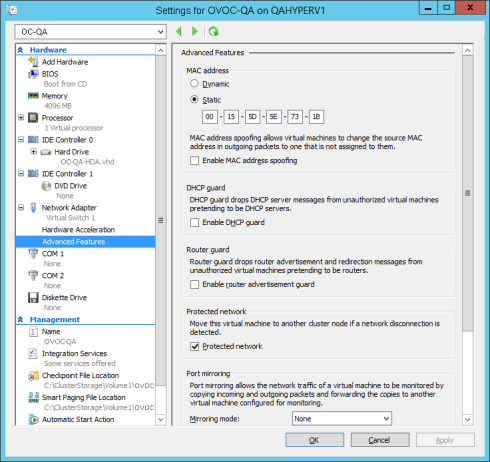
Changing MAC Addresses from 'Dynamic' to 'Static'
By default, the MAC addresses of the OVOC server Virtual Machine are set dynamically by the hypervisor. Consequently, they might be changed under certain circumstances, for example, after moving the VM between Hyper-V hosts. Changing the MAC address may lead to an invalid license.
To prevent this from occurring, MAC Addresses should be changed from 'Dynamic' to 'Static'.
|
➢
|
To change the MAC address to 'Static' in Microsoft Hyper-V: |
|
2.
|
In the Hardware pane, select Network Adapter and then Advanced Features. |
|
3.
|
Select the MAC address 'Static' option. |
|
4.
|
Repeat steps 2 and 3 for each network adapter. |
Advanced Features - Network Adapter – Static MAC Address